Arduino MP3

July 5th, 2011

ArduinoMP3 (Rev C)

The Arduino MP3 webpage is finally up and the source code for the project is on github.

You can find the web pages at:

http://www.brokentoaster.com/arduinomp3

You can find all the future development at GitHub via this link:

https://github.com/brokentoaster/ArduinoMP3

Dynamic Logging Examples

June 27th, 2011

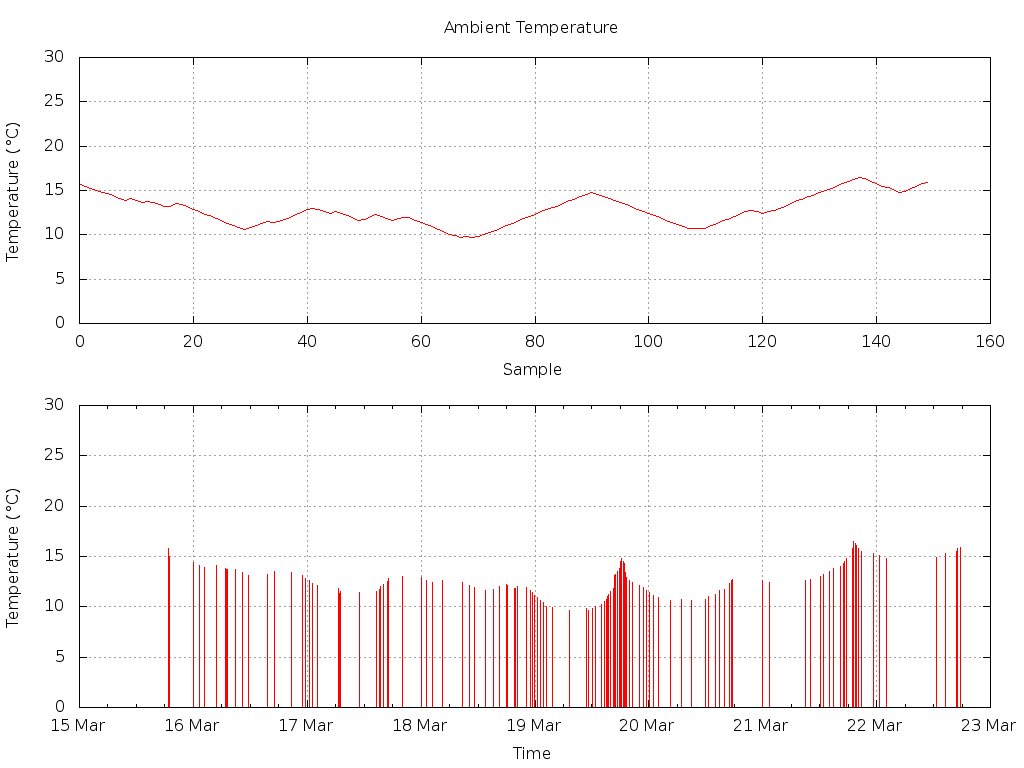
As I mentioned in an earlier post, the Butterfly Logger now has a dynamic logging feature. This post elaborates on the benefits and costs of the feature using some data gathered during testing. Some examples of the output while using the feature is shown below in figures 1 and 2. In processing the output from the logger I created a couple of scripts to analyse the data and create graphs. These are included below as listings 1 and 2. While the new feature allows us to log for longer without the risk of missing events, it also costs us in no longer being able to predict how long a logger can be deployed for in the field.

A Graphical Overview

Figure 1: Dynamic logging example.

The two part graph shown above in figure 1 demonstrates the increasing and decreasing of logging frequency as the monitored signal changes more or less quickly. The signal being monitored in this example is the ambient temperature of my garage over a week in March 2011. This was done using the AVR Butterfly’s onboard thermistor.

The upper part of the graph shows the temperature plotted in order sampled as it is stored in the memory of the logger. The lower part of the graph plots the temperature against time. This is done using the date and time as recorded by the logger and using the following lines in gnuplot:

set xdata time
set timefmt "%Y/%m/%d %H:%M:%S"
plot 'dataFile.log' using 1:8 with impulses notitle

The temperature in the lower section is plotted as impulses simply to highlight the change in logging frequency.

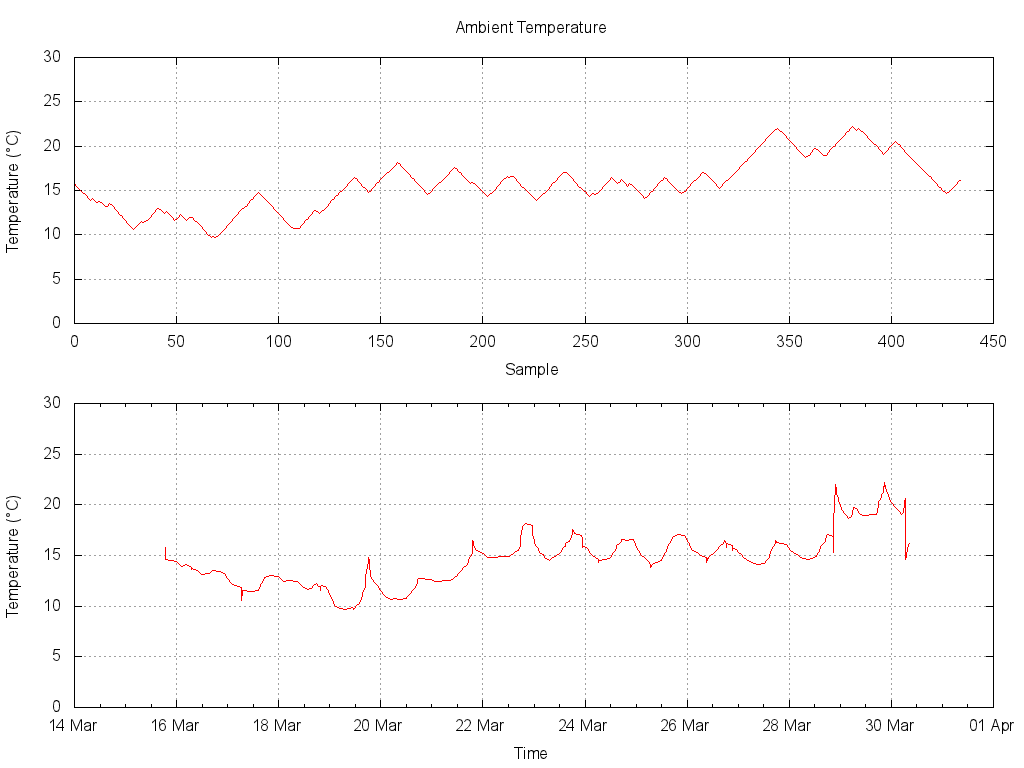
Figure 2: Comparison of data plotted against time or sample index.

The above graph in figure 2 shows a much larger sample from the same logging session. In this plot you can again see the differences between the samples recorded in memory and the samples plotted against time.

You will notice how the samples actually recorded only ever differ by a fixed amount. This is evident through the constant slope of the upper section of the graph. This constant slope, either increasing or decreasing, is an artefact of the logging threshold value. The threshold value is set at compile time in the software.

The software also has a timeout parameter that establishes the maximum logging interval. If no timeout is set the system will only log when the threshold has been exceeded, however if the parameter has been set then the logger will record a sample after a fixed period time (even if the sample threshold has not been exceeded).

The minimum interval is specified by the sample period parameter as used when logging in the standard mode. The timeout value is simply specified as a multiple of this interval.

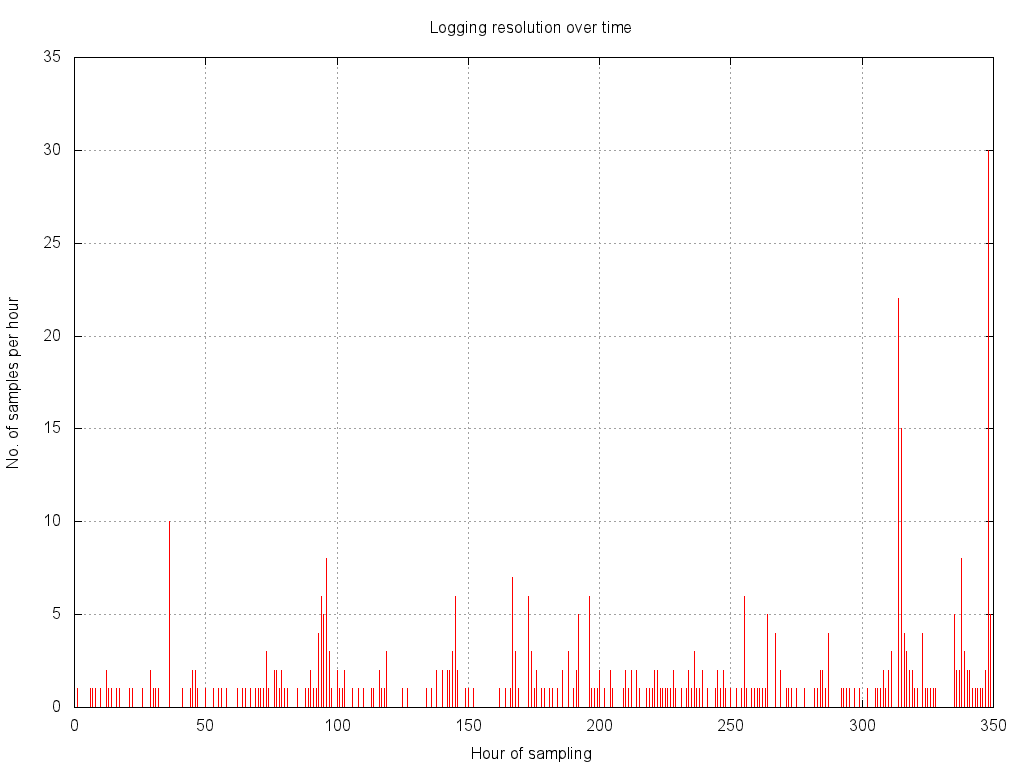
Figure 3: Dynamic resolution of the data expressed as number of samples per hour.

Figure 3 is yet further analysis on the same data from the previous two graphs. This plot shows the logging resolution over time. The resolution is expressed as the number of samples recorded per hour. This figure was calculated by processing the data and counting the number of samples recorded that hour. Where no data is recorded for a given hour a zero is recorded. A Perl script to produce this data from the logger output is shown below in listing 2.

This example gives us a good metric for measuring the effectiveness of dynamic logging. If you examine the graph you can see that, at its peak rate, the logger is recording at a resolution of 30 samples per hour. The logging interval for this session was set to once per second, giving us a maximum sample rate of 3600 samples per hour. As the rate is dynamic it makes sense to also look at the average rate over the whole period, which is just over 2 samples per hour. If we compare the average rate to the peak rate we can gauge the efficiency introduced by the dynamic logging feature.

TABLE 1: Numerical summary
Number of hours monitored: 168
Number of samples recorded: 350
Minimum sample rate: none
Maximum sample rate: 3600 samples per hour
Average sample rate: 2.1 samples per hour
Samples needed if using peak rate: 5040
Samples needed if using maximum rate: 604,000

Conclusions

The benefits of dynamic logging

By looking at the number of samples needed at the peak sample rate and comparing this to the number of samples used, we can calculate the theoretical saving in redundant samples. If we were to capture the same data using standard methods we would have used over 14 times more samples. As our storage space is limited, if we were using a standard technique we could only log for a much shorter time.

This reduction in space used can be taken advantage of in two ways. If the temperature characteristics in the garage remain unchanged the logger could record for 3 years without filling up the flash. This is much much more than possible using the standard technique. Another way to utilise this extra space would be to log more sensors over the same period as possible with standard logging.

Other than storage savings the major benefit of the dynamic sample rate is that dramatic events are not missed. If we had wanted to conserve storage space using standard methods we would risk the possibility of sudden changes in the data being overlooked by a much slower sample rate.
Using a dynamic rate we get the benefits of a higher sample rate without the storage cost.

The costs of dynamic logging

There are a couple of disadvantages to this dynamic sample rate technique. One of these is the reduction in resolution in our sensors. This is due to the threshold introduced before a sample is taken. The resolution of the ADC has effectively been reduced from 1024 to approximately 340 levels. For our example this reduces the temperature to a resolution of 0.1°C per level in the temperature range we are looking at.1

The logger will also consume more power due to being out of sleep mode more often. The logger needs to leave sleep mode often to check if it should be recording a sample to flash. Compared to just reading of the sensorsWriting to flash is by far the most power hungry activity of the logger when c, because of this I don’t anticipate the extra power requirements to be too great, although I have not actually measured the impact.

When using a fixed sample rate technique you can calculate the exact length of time a logger will be able to log for prior to deployment. With the dynamic sample rate you can no longer know how long you can log for when deploying a logger. To mitigate this issue you could either make a prediction based on prior knowledge or develop a method to alert the user when the memory is approaching capacity.

Using data previously gathered in an environment you can predict how long it is reasonably likely to log for. Using the example data used I would calculate the expected logging capacity based on 700 samples a week2. Using this value would allow logging for something like 80 weeks or so. This is of course still 7 times longer than standard logging would allow. These types of calculations could potentially be incorporated to the firmware to make using dynamic logging more useful.

Scripts

As promised above I have included the scripts used to produce the data and graphs. They might be useful to anyone getting started with using Gnuplot, BASH and Perl to automate graphing and analysis.

#!/bin/sh

# script to plot logging results temperature against time.
# also plot temperature samples for comparison and analysis of
# the dynamic logging system.

#assume arg 1 is name of file with ^M's ^D's and non data lines already removed.

maxtemp=30

# look at number of points per hour
#cut -d\  -f2 ${1} | cut -d: -f1 | uniq -c > ${1}_res

# TODO: need to pad out hours with zero points
# DONE: use pad.pl to calculate number of samples per hour and pad any zeros
# 	Does not check for an entire day with out samples though.
cat ${1} | ./pad.pl > ${1}_res

gnuplot << EOF
set terminal png size 1024,768 enhanced font "/Library/Fonts/Microsoft/Arial,12"
set output "$1_resolution.png"
set origin 0,0
set grid
set yrange [0:35]
set title 'Logging resolution over time'
set ylabel 'No. of samples per hour'
set xlabel 'Hour of sampling'
plot '${1}_res' u 2 w i  not

set output "${1}_comparison.png"
set multiplot
set origin 0,0.5
set size 1,0.5
set xdata
set yrange [0:${maxtemp}]
set title 'Ambient Temperature'
set xlabel 'Sample'
set ylabel 'Temperature (°C)'
plot '$1' u 8 w l not

set origin 0,0
set size 1.0,0.5
set xdata time
set timefmt "%Y/%m/%d %H:%M:%S"
set ylabel 'Temperature (°C)'
set yrange [0:${maxtemp}]
set xlabel 'Time'
set title ''
set format x "%d %b"
plot '$1' u 1:8 w l not

set output "${1}_impules.png"
set multiplot
set origin 0,0.5
set size 1,0.5
set xdata
set yrange [0:${maxtemp}]
set title '150 Samples of Ambient Temperature'
set xlabel 'Sample'
set ylabel 'Temperature (°C)'
plot '< head -150 $1' u 8 w l not

set origin 0,0
set size 1.0,0.5
set xdata time
set timefmt "%Y/%m/%d %H:%M:%S"
set ylabel 'Temperature (°C)'
set yrange [0:${maxtemp}]
set xlabel 'Time'
set title ''
set format x "%d %b"
plot '< head -150 $1' u 1:8 w i not
EOF

open $1_resolution.png
open $1_comparison.png
open $1_impules.png

Listing 1: BASH script to process the data into graphs.

#!/usr/bin/perl -w

use strict;
# simple script to process temperature logs and show number of samples per hour

# my old script did this...
## look at number of points per hour
##  cut -d\  -f2 ${1} | cut -d: -f1 | uniq -c > ${1}_res
# .. but that didn't account for hours with no samples at all.

# my variables...
my @lines;
my $line;
my $hour;
my $previous_hour;
my $first = 1;
my $count = 0;
my @fields;
my @time;

# read in all lines from stdin
chomp(@lines = <STDIN>); 

#process each line in turn
foreach $line (@lines) {

		# extract the hour value from the time, ignoring the date.
		@fields = split /\s+/,$line;
		@time = split /:/,$fields[1];
		$hour = $time[0];

		# set up the previous_hour for the first line to enable the count
		if ($first == 1){
			$previous_hour = $hour;
			$first = 0;
		}

		if ($hour == $previous_hour){
			#increment the count of samples for this hour
			$count++;

		} else{
			#  print our total and move on to the next hour
			print "$previous_hour \t $count \n";
			$count = 0;
			$previous_hour++;
			$previous_hour %= 24;

			# check for non consecutive hours and pad out with zero totals
			# assuming their hasn't been a total day without samples
			while ($previous_hour != $hour){
				print "$previous_hour \t $count \n";
				$previous_hour++;
				$previous_hour %= 24;
			}

			# remember to count this first new sample in our totals
			$count=1;
		}
}

# done

Listing 2: PERL script to process the data logger output and calculate the number of samples per hour.

  1. Due to the non-linear nature of the thermistor, the effective temperature resolution will change of over the range of the sensor []
  2. Doubling the average sample rate we saw in the data simply for reasons of contingency. []

Butterfly Logger Firmware 0.31A

May 3rd, 2011

I’ve just completed another release of firmware for the AVR Butterfly Logger project. It can be download it at the project site on Sourceforge.

New Features

The main feature of this update is dynamic logging. I’ll post some examples of this in action soon but for now I’ll just give you a basic overview.

Dynamic logging means that the period between samples is altered dynamically at runtime depending on the state of the system being monitored. If the system is undergoing rapid change then many samples will be taken automatically. If the system is stable then very few samples will be taken at that time. This has the same effect as sampling continuously at a high sample rate but removing any repeated or redundant data except that the repeated and redundant data is simply never recorded.

When using the dynamic logging feature you will need to log time and date to enable you to be able to properly reconstruct the data later once downloaded.

The dynamic logging feature also has an optional timeout value so that if no change has been read from the ADC for a large number of log attempts then a log is forced to ensure a minimum resolution such as 1 sample every hour is maintained.

Currently the dynamic logging feature only monitors a single ADC channel. I have plans to extend it to monitor other sensors and also multiple sensors simultaneously in future releases.

Setup and options for the dynamic logging features are currently maintained in the file main.h. There are some comments in the file to explain the options available.

To save on program space the dynamic logging parameters can be implemented as a compile time option. If more flexibility is wanted the features can also be implemented with the parameters as runtime changeable options that can be altered via the serial port interface.

Bug Fixes

This version also includes a fix for an issue with updating the LCD readings after the flash was full.

KiCad OS X nightly development builds are back

February 9th, 2011

After about eight months of not running I have fixed my nightly builds of KiCad for OS X. I have finally found the time to switch my KiCad repository over to the Bazaar and launchpad system that the KiCad developers have been using for some time now.

After a few changes here and there and updating wxWidgets to 2.9.1 I have the nightly build system back up and running. The build script I am using is given at the end of this post in Listing 4.

The KiCad compiling instructions for OS X have been updated and now work a lot better. You should be able to find the latest version over at launchpad here.

In case anyone else runs into similar problems I have repeated some of the errors and my hacks/work-arounds solutions below.

The nightly builds themselves are here as usual.

Getting it to compile again.

After following the compilation instructions referred to above, I ran into the following error. After a bit of web crawling and reading development lists I found that I needed to use the XML library built into wxWidgets rather than the system one.

The error looked like this:

Linking CXX executable eeschema.app/Contents/MacOS/eeschema
Undefined symbols:
“_XML_GetErrorCode”, referenced from:
wxXmlDocument::Load(wxInputStream&, wxString const&, int)in libwx_osx_cocoau-2.9.a(monolib_xml.o)
“_XML_ErrorString”, referenced from:
wxXmlDocument::Load(wxInputStream&, wxString const&, int)in libwx_osx_cocoau-2.9.a(monolib_xml.o)
“_XML_SetUnknownEncodingHandler”, referenced from:
wxXmlDocument::Load(wxInputStream&, wxString const&, int)in libwx_osx_cocoau-2.9.a(monolib_xml.o)
“_XML_SetCharacterDataHandler”, referenced from:
wxXmlDocument::Load(wxInputStream&, wxString const&, int)in libwx_osx_cocoau-2.9.a(monolib_xml.o)
“_XML_SetUserData”, referenced from:
wxXmlDocument::Load(wxInputStream&, wxString const&, int)in libwx_osx_cocoau-2.9.a(monolib_xml.o)
“_XML_ParserFree”, referenced from:
wxXmlDocument::Load(wxInputStream&, wxString const&, int)in libwx_osx_cocoau-2.9.a(monolib_xml.o)
“_XML_SetCdataSectionHandler”, referenced from:
wxXmlDocument::Load(wxInputStream&, wxString const&, int)in libwx_osx_cocoau-2.9.a(monolib_xml.o)
“_XML_SetCommentHandler”, referenced from:
wxXmlDocument::Load(wxInputStream&, wxString const&, int)in libwx_osx_cocoau-2.9.a(monolib_xml.o)
“_XML_Parse”, referenced from:
wxXmlDocument::Load(wxInputStream&, wxString const&, int)in libwx_osx_cocoau-2.9.a(monolib_xml.o)
“_XML_SetElementHandler”, referenced from:
wxXmlDocument::Load(wxInputStream&, wxString const&, int)in libwx_osx_cocoau-2.9.a(monolib_xml.o)
“_XML_ParserCreate”, referenced from:
wxXmlDocument::Load(wxInputStream&, wxString const&, int)in libwx_osx_cocoau-2.9.a(monolib_xml.o)
“_XML_GetCurrentLineNumber”, referenced from:
_StartCdataHnd in libwx_osx_cocoau-2.9.a(monolib_xml.o)
_CommentHnd in libwx_osx_cocoau-2.9.a(monolib_xml.o)
_TextHnd in libwx_osx_cocoau-2.9.a(monolib_xml.o)
_StartElementHnd in libwx_osx_cocoau-2.9.a(monolib_xml.o)
wxXmlDocument::Load(wxInputStream&, wxString const&, int)in libwx_osx_cocoau-2.9.a(monolib_xml.o)
“_XML_SetDefaultHandler”, referenced from:
wxXmlDocument::Load(wxInputStream&, wxString const&, int)in libwx_osx_cocoau-2.9.a(monolib_xml.o)
ld: symbol(s) not found
collect2: ld returned 1 exit status
make[2]: *** [eeschema/eeschema.app/Contents/MacOS/eeschema] Error 1
make[1]: *** [eeschema/CMakeFiles/eeschema.dir/all] Error 2
make: *** [all] Error 2

Error 1: Missing XML library

This was fixed by adding the --with-expat=builtin option when configuring wxWidgets.

This then lead me to another error to do with wxWidgets headers using anonymous enums and anonymous types. Part of this second error is shown below.

/opt/wxwidgets-svn/include/wx-2.9/wx/combo.h: In member function ‘bool wxComboPopup::IsCreated() const’:
/opt/wxwidgets-svn/include/wx-2.9/wx/combo.h:774: error: ‘‘ is/uses anonymous type
/opt/wxwidgets-svn/include/wx-2.9/wx/combo.h:774: error: trying to instantiate ‘template struct boost::polygon::is_polygon_90_set_type’
/opt/wxwidgets-svn/include/wx-2.9/wx/combo.h:774: error: ‘‘ is/uses anonymous type
/opt/wxwidgets-svn/include/wx-2.9/wx/combo.h:774: error: trying to instantiate ‘template struct boost::polygon::is_polygon_45_or_90_set_type’
/opt/wxwidgets-svn/include/wx-2.9/wx/combo.h:774: error: ‘‘ is/uses anonymous type
/opt/wxwidgets-svn/include/wx-2.9/wx/combo.h:774: error: trying to instantiate ‘template struct boost::polygon::is_any_polygon_set_type’
make[2]: *** [gerbview/CMakeFiles/gerbview.dir/class_gerber_draw_item.cpp.o] Error 1
make[1]: *** [gerbview/CMakeFiles/gerbview.dir/all] Error 2
make: *** [all] Error 2

Error 2: Anonymous enums using anonymous types being marked as errors by the compiler

Rather than figure out which flag to set on the cmake/compiler/linker mess, I went for a brute-force approach that I found here after a small amount of searching. I have expanded from the script given to the ones below to account for the particular style used in the wxWidgets header files.

for i in `grep -l ‘enum {‘ *.h | sed -e ‘s/\.h//g’` ; \
do \
perl -pi -e \
“s/enum {/’enum en_$i’ . int(rand(100)) .’ {‘/eg” $i.h; \
done

Listing 1: Small script to replace all occurances of “enum {” with “enum en_filenameXX {“

Listing 1 is the original script given which enumerates the anonymous enums with a name consisting of the filename (without the extension) and a random number from 0-99.

This next command I adapted from the first to account for the fact that the style of the wxWidgets header files meant that a lot of the enums were declared with the keyword enum alone on a line with the rest of the declaration on the following line. This finds those declarations and assigns them a name similar to the first script but with a number from 100-199 to ensure we don’t repeat names already given. It is shown below in Listing 2.

for i in `grep -l ‘^enum en_.*$’ *.h | sed -e ‘s/\.h//g’` ;\
do \
perl -pi -e \
“s/^enum$/’enum en_$i’ . int(rand(100)+100) .”/eg” $i.h;\
done

Listing 2: Small script to replace all occurrences of “enum” with “enum en_filename1XX ” where “enum” occurs by itself on a line and assuming the rest of the declaration continues on the following line.

The problem with the previous two scripts is that they use a random number to assign the unique identifier. Being random there is the possibility that this number can come up twice.
This last command (Listing 3) helps us check for duplicate names generated by the previous scripts. We then need to go in and fix the duplicates by hand.

grep ‘enum en’ *.h | sort | uniq -c | sort -n

Listing 3: Command to check for duplicate names created by previous two scripts.

A single script could be written to give unique identifiers to all the anonymous enums and ensure that the identifiers are unique. But as this was a quick enough process and solved my problems I haven’t bothered to refine it further. Perhaps next time I update wxWidgets I’ll give it another thought. I thought this was a useful enough hack to share.

Automating the builds

Listing 4 below shows my daily build script which automatically updates the code to the latest development snapshot via Bazaar. Next it will check if the version has changed and if so build and package the latest version. If this all goes well we compress the new version into an archive and upload it to the website. If the compilation does not complete according to plan then the error log and some other useful information is uploaded to the website instead. Note that all usernames and passwords have been changed to placeholders in this version. This is run every day (or night depending on your time zone) by a cron job.

#!/bin/sh
#
. /Users/nick/.bashrc

#Make a nightly build of KiCad

#update from launchpad using bazaar
cd /Temp/kicad.bzr/kicad/
bzr update

new_version=`bzr revno`
old_version=`cat /temp/install/version.txt`
if [ $new_version -gt $old_version ]
then

#build it
cd build/release

cmake ../../ -DwxWidgets_CONFIG_EXECUTABLE=”/usr/local/bin/wx-config” -DwxWidgets_ROOT_DIR=”/opt/wxwidgets-svn/include/wx-2.9/” -DCMAKE_INSTALL_PREFIX=”/temp/install” -DCMAKE_OSX_ARCHITECTURES=”ppc -arch i386 -arch x86_64 -isysroot /Developer/SDKs/MacOSX10.5.sdk/ -mmacosx-version-min=10.5″ -DCMAKE_CXX_FLAGS=”-D__ASSERTMACROS__” -DCMAKE_OSX_SYSROOT=”/Developer/SDKs/MacOSX10.5.sdk”

# make clean
if make > /temp/kicad_errors-${new_version}.txt 2>> /temp/kicad_errors-${new_version}.txt && make install
then
file=kicad_osx_v${new_version}
echo $new_version > /temp/install/version.txt
mv /temp/kicad_errors-${new_version}.txt /temp/install/build_log.txt

#bundle
cd /temp/
cp -rf install ${file}
tar -czf ${file}.tgz ${file}

#upload
curl -T ${file}.tgz ftp://user:password@ftp.brokentoaster.com/
rm -rf ${file}

# cd /temp/kicad-sources/build/release/
# /Developer/usr/bin/packagemaker –doc osx-package.pmdoc –title ‘Kicad’ -o ${file}.mpkg
# curl -T ${file}.mpkg ftp://user:password@ftp.brokentoaster.com/

else

#insert some useful debug info
echo “*** GCC Version Info ***”>> /temp/kicad_errors-${new_version}.txt
gcc -v >> /temp/kicad_errors-${new_version}.txt

echo “*** wxWdgets Version Info ***”>> /temp/kicad_errors-${new_version}.txt
wx-config –list >> /temp/kicad_errors-${new_version}.txt
head /Volumes/Store/wxWidgets-2.9.1/osxbuild/config.log >> /temp/kicad_errors-${new_version}.txt

curl -T /temp/kicad_errors-${new_version}.txt ftp://user:password@ftp.brokentoaster.com/
fi

# go to sleep
if [ ! -e /Users/nick/Applications/insomnia.flag.true ]
then
open /Users/nick/Applications/SleepNow.app
fi
else
echo “KiCad is up to date : ) ”
fi

Listing 4: BASH script to update, build and upload KiCad. This is run daily via a cron job

So if you want to test the latest developer build of KiCad on OS X then look no further than here.

Butterfly Logger Firmware 0.30C (bugfix)

January 22nd, 2011

Last week I released another firmware update for the AVR Butterfly Logger. This was a bugfix to the thermistor routines for calculating negative temperatures from the onboard temperature sensor.

You can download the source code from SourceForge.

The thermistor routines in the logger project were adapted from Martin Thomas’ port of the Atmel AVR Butterfly example code. This routine compares the ADC input from the thermistor sensor to a table of known readings. The table1 contains a single entry for each degree celsius from -15°C to +60°C. The routine would simply step through the table until the ADC reading exceeded2 the value in the table. The position in the table is then given as the temperature in degrees celsius.

When first developing the data logger in 2004 and 2005 I quickly wrote an interpolation routine that would extend the integer value given in the original with an extra two decimal places. After finishing writing the code I reviewed both the code and the corresponding output. At the time of that brief review everything appeared to make sense. As the original project had other more accurate temperature sensors available, the operation of the onboard temperature sensor was not critical. The onboard temperature sensor was instead intended as a fast secondary sensor for live feedback to the user via the LCD and so the code was not widely tested. Whoops.

This December (being the coldest on record in the UK for the last 100 years) showed up some of the flaws in my code. After some prompting from a couple of users of the project I set aside some time to investigate further. My investigation involved writing a test routine to simulate all possible sensor readings and then evaluating the results. This was an incredibly simple exercise, just a few lines of code and then plotting the results with Gnuplot. The output from the function is shown below in Figure 1.

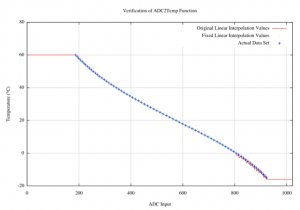
Figure 1: Thermistor routines test output

This figure shows the full-scale results for the original and fixed routines along with the data points given in the original source. As you can see the interpolated line appears to follow the datapoints quite nicely until it drops below zero degrees.

At this point the linear interpolation is way-off and producing mostly garbage (you can see this clearly in the close-up below in Figure 2)

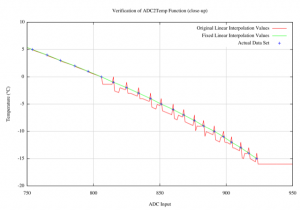
Figure 2: Close-up of the thermistor routines test output

Looking at the close-up in Figure 2 you can see the awful job the routine does when dealing with negative temperatures. If you look very closely at the positive temperatures you will also note a small error in that calculation as well. After plotting the output and going over the code it was very easy to spot the couple of errors. After the corrections the graph of the output (The green line in Figures 1 and 2) intersects perfectly with the data points given in the source code. If it were not for visual inspection of the results (via the graph) I don’t think I would have noticed this second error at all.

Further changes were also made to the routine so that when the readings are outside the range specified by the data table then they will record an over or under temperature error. This is signified in the log as +++.++ or ---.-- for over temperature or under temperature respectively. On the LCD, +++.+C or ---.-C is displayed. Previously the routine had just returned the maximum or minimum temperature from the table.

It had been at the back of my mind that there was something not quite right about that bit of code for some time. It was so simple in the end to write a routine to test the function with all possible inputs that I could kick myself for not doing it earlier. By plotting the results on a graph it became obvious how the code was misbehaving. The key lessons I’ve learned from this it is that a little testing goes a long way and that some simple visualisation can really help you understand a bug quickly.

More information about the AVR Butterfly Logger project can be found at the project website.

Any questions can be asked in the project forums.

  1. Technically two tables are used, one for positive values and one for negative. []
  2. The thermistor is a negative temperature coefficient (NTC) device. This means as the temperature increases the resistance drops. In our electrical configuration of the sensor this also applies to the voltage seen at the ADC input. []

Rigol 1102E: First Impressions

November 15th, 2010

I recently decided to treat myself and get an oscilloscope. After much consideration I decided to go with an entry level Rigol. I liked the large number of positive reviews I was reading for these scopes all over the net (two examples here and here). After patiently waiting, unpacking and having a good play I can honestly say I’m impressed.


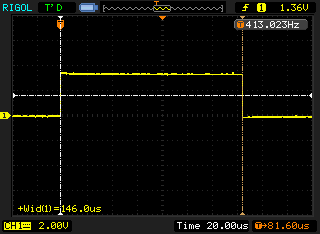
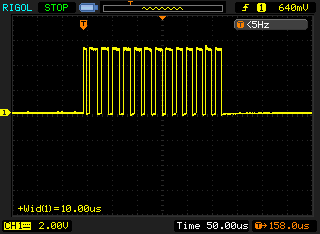
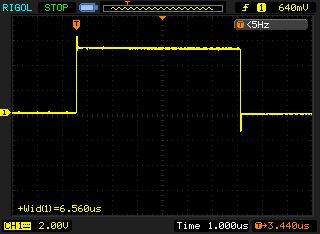
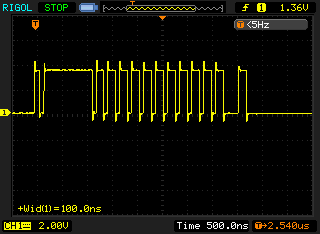
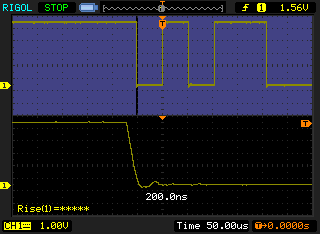
19200 baud asynchronous serial, first 6 bits with close up on start-bit edge.

Figure 1: A sample of the bitmap output from the Rigol 1102E

Figure 1 above shows serial communications on my Reprap Mendel. This has been my test signal as I put the scope through its paces while I try to locate the source of intermittent serial communications problems. Having bitmap output makes blogging about electronics a whole lot easier.

After having a few weeks play I have to say I’m a fan of the interface. I was pleasantly surprised by the center push feature on all the dials. A center push on the vertical position will center the trace about the zero point and a center push on the horizontal will center the trace about the trigger point. These are very nice interface enhancements that feel very natural and intuitive to use.

The performance of the scope is great although I have not pushed it anywhere near the limits.

To give you a better idea of what I am comparing this to I’ve compiled a list scopes I’ve used in the passed. These are scopes I’ve used in the workplace, spending countless days interacting with.

  • Tektronics 475 200Mhz – A fantastic old analogue storage scope
  • Tektronics TDS 320 100Mhz – A nice digital storage scope (not LCD though), with the printer, GPIB and serial communication cards.
  • Tektronics TDS 1002 60Mhz – An entry level, modern LCD scope but no printing or serial communication.
  • Tektronics TDS 3000 series – DPO very nice colour LCD scope with floppy drive for saving waveforms to.

This is the first scope I’ve used which I’ve actually forked out the cash for so I am very happy with my purchase and find it compares very favourably to those I’ve used in the past. This scope has more features than I’ve ever had before. The datasheet for the DS1000E Series is here.

  • I like the modern features (USB host, USB remote, Colour LCD, FFT, Pass Fail, 1M samples, etc)
  • I like the legacy features (RS232 port on the back)
  • I like the specs (100MHz, 1GS/s)
  • I like the warranty (3 years parts and labour)
  • I REALLY Like the price. This scope cost me £420 including VAT, delivered to my door.

I’d like to post a more complete review sometime, but I think there are already plenty of people saying the same as what I’m saying — A fantastic scope, unbeatable for the price.

A few website issues but everything is OK now.

November 1st, 2010

Sorry to all of you who have been having problems with the site this past week. Someone managed to get some malicious code into the site either via a PHP exploit or sniffing my FTP password.

I have managed to get everything cleaned up, reviewed my security practices (no more FTP) and updated my WordPress installation. If you find any images are missing or something on the site isn’t as it was then please let me know.

Apologies to anyone how has been infected by malware. The site was apparently spreading malware to unprotected machines between the dates 19th and 27th of October.

Butterfly Logger Firmware 0.30

October 25th, 2010

In an unprecedented move I’ve released another version of the firmware for the AVR Butterfly Logger within a few months of a previous release. This was a minor change just adding MAX6675 based J and K thermocouple support.

You can download the source code from sourceforge, with the changes from the previous version are listed below.

Changes summary:
- MAX6675 K-Type Thermocouple logging (adjustable averaging)
- MAX6675 available on 'T' via the USART.
- MAX6675 available on LCD via 'THERMOCOUPLE' Menu.

The new library has configurable support for averaging readings but each individual reading takes 200ms so an 8 point average will take 1.6s to complete. If you use this averaging feature please make sure that your logging interval is long enough to ensure enough time for the complete reading to finish. While thermocouples are capable of measuring wide ranges of temperature both positive and negative the MAX6675 is limited to returning readings between 0°C and +1024°C. If the chip detects an open thermocouple then the system will log ‘-1′ as the temperature.

The MAX6675 connects to the AVR Butterfly via the SPI bus. This bus is also used by the onboard Dataflash and the Kionix acceleration sensors (when in use). As this bus is already available the only additional pins required is a single chip select (CS). The library currently only supports a single thermocouple input but the code could easily be expanded to suport multiple MAX6675s requiring a single CS line for each additional chip and thermocouple.

The SPI bus is available on PORTB and also via the ISP connector. An example breakout PCB for the MAX6675 was published here. Default wiring from the this PCB to the AVR Butterfly Logger is given below:

PCB MAX6675 Butterfly J403 (ISP) J405 (USI)
1 1 GND GND 6 4
2 7 MISO PB3 1 -
3 6 CS PE6 - 3
4 5 SCK PB1 3 -
5 4 VCC VCC 2 -

More information about the data logger project can be found at the project website.

Any questions can be asked in the project forums.

Butterfly Logger Firmware 0.29

September 19th, 2010

I’ve finally managed to get another release of the Butterfly Logger firmware done. I was supposed to have released a lot of this a couple of years ago but it got lost in the ether somewhere.

Without any further ado the source code is here, with the changes from the previous version are listed below.

Changes summary:
- Added  'j' and 'J' commands to read SHT75 Humidity and Temp.
- Fixed the SHT75 clock waveform (now it looks  symetrical )
- Added ENABLE_SHT_CALCS option to print/store real world values for SHT75
- Tuned vref for more accurate results. (Battery voltage and dependant SHT75 calculations)
- Added Kionix accelerometer logging
- Fixed vref ( done by matthias.weisser )
- Make file uses no-inline-small-functions ( done by matthias.weisser )
- Direction ADCs are now refered to as Auxilliary ADCs

More information about the data logger project can be found at the project website.

Any questions can be asked in the project forums, here.

Using thermocouples with the Reprap Mendel

September 6th, 2010

Using thermocouples with the Reprap Mendel is pretty straight forward, although I did overcome a couple of issues in getting it working.

A known issue with the MAX6675 Arduino/Reprap code

The MAX6675 chip can take up to 220ms to take a reading from the thermocouple and the reading begins automatically after the previous read. If another read is attempted before the current reading has been completed then the chip returns the previous value and restartsthe internal analog to digital the conversion. This means that if you read from the chip every 150ms or so you will always get the same first reading returned again and again.

The arduino library code needs a 220ms delay between multiple reads to allow for the MAX6675 chip to take another reading. In the current state the library simply reads the same value repeatedly. Luckily it is a known issue documented on the project’s site and is not hard to fix.

The taking of a single reading rather than taking a number of readings and averaging will contribute to a high noise level in the thermocouple readings when using this software.

Discovering the problem

When testing the PCB with the library code everything works fine. The arduino returns a reading every second and everything looks good.

When using the Reprap firmware with the thermocouple code it always returned the first value read from the chip (usually 24°C or so). This lead to things getting pretty hot as the extruder would turn the heater to full duty cycle while recording no change in temperature.

I first looked at the SPI lines on the scope to see if there was excessive noise or some other issue. I also compared this side by side with the ‘working’ arduino system. The scope traces are shown below. The reference channels (R1 and R2) are the reprap firmware and the bottom traces (1 and 2) are the arduino. I noticed nothing wrong with the traces, they both looked very good.

Reprap code compared to aduino library code communicating to the MAX6675.

It was here however that I noticed that the arduino code calls another read to the chip immediately after the preceding read. After a bit more investigation I noticed that the library software calls the temperature reading function 5 times consecutively and always returns 5 identical results. A quick read of the data sheet confirmed the typical conversion time to be 170ms with a maximum of 220ms. The arduino library starts a conversion just 20μs after finishing reading the last. Reading the data sheet further also confirmed the action of restarting a conversion every time the chip is read.

I monitored the lines on a scope and found that the Reprap software was indeed reading the chip every 136ms. To fix this I simply changed SLOW_CLOCK in configuration.h to 8089 from 5000. Based on the current delay giving 136ms, this gives 220ms delay between calls to the thermocouple chip. After making this change to the firmware the thermocouple now works perfectly.

Time between calls to the MAX6675 thermocouple chip using the standard firmware on my reprap.

Fixing the problem

A more robust fix to the reprap extruder firmware is shown below, but I have not tested this code yet. This simply exits the temperature reading method if enough time has not elapsed between calls to the function. The advantage of this is that the main loop can run as fast as it needs to without impacting on the operation of the thermocouple sensors.

#ifdef MAX6675_THERMOCOUPLE
#define MAX6675_CONVERSION_TIME 220 // number of milliseconds between valid temperature readings

  int value = 0;
  byte error_tc;

  static unsigned long last_read_time=0; // number of milliseconds since power on at last MAX6675 read
  unsigned long time_since_last_read=0;  // number of milliseconds since last read of MAX6675 

  /* check the chip is ready to produce a new sample */
  time_since_last_read=millis()-last_read_time;

  /* only read from the chip if a conversion has been completed */
  if(time_since_last_read > MAX6675_CONVERSION_TIME){

    digitalWrite(TC_0, 0); // Enable device

    /* Cycle the clock for dummy bit 15 */
    digitalWrite(SCK,1);
    digitalWrite(SCK,0);

    /* Read bits 14-3 from MAX6675 for the Temp
     	 Loop for each bit reading the value
     */
    for (int i=11; i>=0; i--)
    {
      digitalWrite(SCK,1);  // Set Clock to HIGH
      value += digitalRead(SO) << i;  // Read data and add it to our variable
      digitalWrite(SCK,0);  // Set Clock to LOW
    }

    /* Read the TC Input inp to check for TC Errors */
    digitalWrite(SCK,1); // Set Clock to HIGH
    error_tc = digitalRead(SO); // Read data
    digitalWrite(SCK,0);  // Set Clock to LOW

    digitalWrite(TC_0, 1); //Disable Device

    last_read_time = millis(); //remember the read time for next time

    if(error_tc)
      currentTemperature = 2000;
    else
      currentTemperature = value>>2;
  }
#endif

}

The arduino library can be improved by simply inserting the following at line 55 of the file MAX6675.cpp just before the end of the for loop.

if (i>1) delay(220); // Wait 220ms for next sample to be ready

This will force a 220ms delay when reading the thermocouple multiple times via the read_temp(int samples) function. Alternatively you could use the millis() function to track the last time it was read and automatically delay the read by the appropriate amount.